
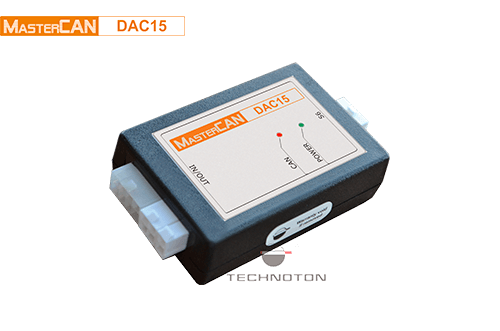
MASTERCAN DAC J1939 I/O MODULE
November 21, 2025
S7 RADIOBOX CAN SIGNAL CONVERTER
November 21, 2025
he CAN BUS ANALYZER SIMULATOR MASTERCAN TOOL is a powerful software-and-hardware analytical tool engineered for programmers, design engineers, and service technicians working with SAE J1939 CAN bus architecture, telematics systems, fuel sensors, and onboard gateways. It serves as an all-in-one diagnostic unit for real-time CAN data monitoring, automatic PGN parsing, payload logging, and hardware-level PGN emulation.
Stock: available
CAN BUS ANALYZER SIMULATOR MASTERCAN TOOL
The CAN BUS ANALYZER SIMULATOR MASTERCAN TOOL is a powerful software-and-hardware analytical tool engineered for programmers, design engineers, and service technicians working with SAE J1939 CAN bus architecture, telematics systems, fuel sensors, and onboard gateways. It serves as an all-in-one diagnostic unit for real-time CAN data monitoring, automatic PGN parsing, payload logging, and hardware-level PGN emulation.
Equipped with dual communication channels for standard CAN 2.0B networks and PC USB interfaces, the CAN BUS ANALYZER SIMULATOR MASTERCAN TOOL enables seamless reading and clearing of Diagnostic Trouble Codes (DTCs) across Electronic Control Units (ECUs). Featuring software-selectable baud rates up to 1000 kbit/s and built-in bus termination resistors, it streamlines the design, testing, and troubleshooting of modern industrial and marine telematics infrastructure.
Key Features of the CAN BUS ANALYZER SIMULATOR MASTERCAN TOOL
-
Real-Time CAN Data Parsing & Logging: Automatically parses and displays PGN and SPN parameters in decimal, HEX, and plain-text formats with direct file logging
-
Full PGN Emulation & Modeling: Emulates individual or grouped PGN messages with editable SPN values and selectable 11-bit or 29-bit identifier lengths
-
Comprehensive ECU Diagnostics: Reads, identifies, and clears diagnostic trouble codes (DTC) across vehicle and machinery electronic control units
-
S6 Telematics Interface Configuration: Monitors, configures, and diagnoses sensors and telemetry equipment utilizing S6 Technology
-
Adjustable Bus Speeds & Termination: Software-configurable CAN baud rates (100, 125, 250, 500, 1000 kbit/s) with software-enabled 120 Ohm terminating resistor
-
Contactless Bus Connection Compatible: Integrates cleanly with CANCrocodile contactless readers for non-intrusive data sniffing without piercing CAN wiring
Main Tasks Solved
-
Design, configuration, and testing of SAE J1939 CAN bus telemetry equipment
-
CAN message traffic analysis, filtering, and long-term logging
-
Reading and troubleshooting ECU DTC fault codes
-
S6 technology sensor calibration and network monitoring
Technical Specifications
| Specification | Value / Detail |
| Product Name / Keyword | CAN BUS ANALYZER SIMULATOR MASTERCAN TOOL |
| Supported Standard | SAE J1939 / CAN 2.0B / S6 Telematics Interface |
| Vehicle CAN Bus Interface | CAN 2.0B (11-bit and 29-bit identifiers) |
| PC Interface | USB |
| Configurable Baud Rates | 100 / 125 / 250 / 500 / 1000 kbit/s |
| Nominal Supply Voltage | 9 V DC to 45 V DC (or PC USB Power) |
| Current Consumption | $\le 200\text{ mA @ 12 V}$ / $\le 100\text{ mA @ 24 V}$ |
| Operating Temperature | -10 °C to +60 °C (14 °F to 140 °F) |
| Ingress Protection Rating | IP40 |
| Overall Dimensions | $114 \times 85 \times 35\text{ mm}$ |
| Unit Weight | $\le 0.3\text{ kg}$ |
Package Contents
-
1 × CAN BUS ANALYZER SIMULATOR MASTERCAN TOOL Hardware Interface Unit
-
USB PC Interface Cable
-
CAN Bus Terminal Adapter Wiring Harness
-
MasterCAN Tool Software Suite & Driver Installation CD/USB